
Choosebox Build-your-own boxes and bundles for Shopify
Let customers build their own box or mix-and-match bundle. Pick products, get a discount, and check out as one box.
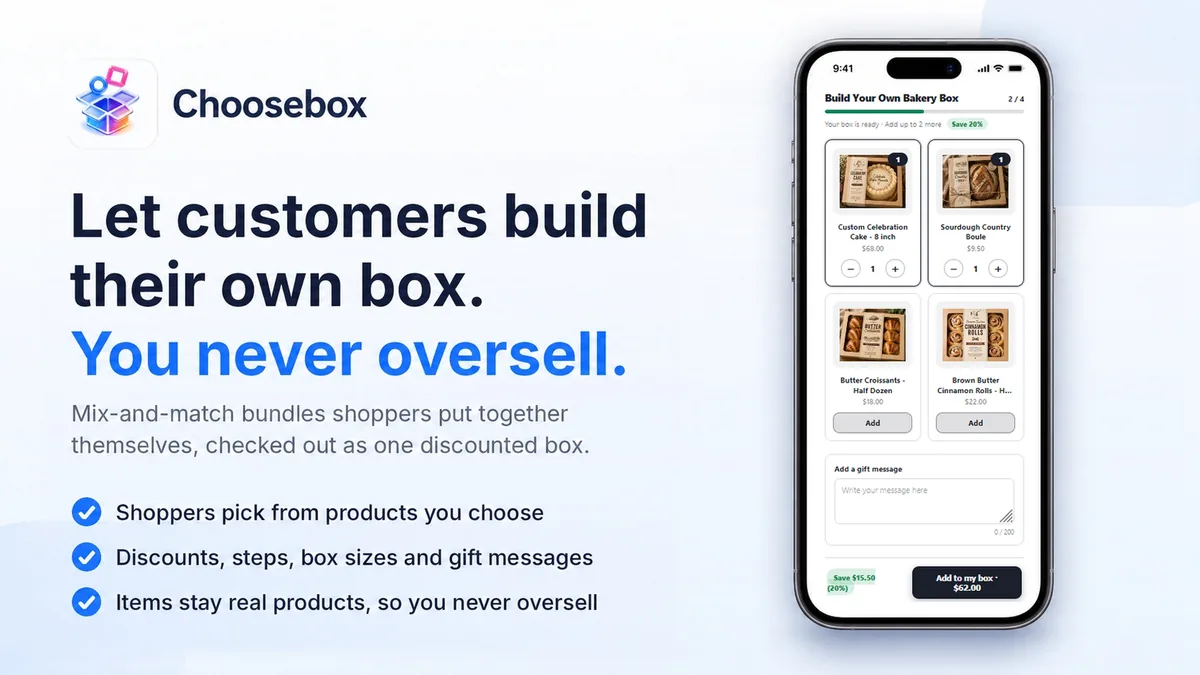
Choosebox turns your products into a build-your-own-box experience: choose which products are eligible, set how many items go in a box, and pick the discount. At checkout the items collapse into one discounted box line, and because every item is a real product, stock stays right and you never oversell.
Install in a couple of clicks, create your first box, and add it to any page. Free plan available, no credit-card traps.
See it in action
Watch the whole setup: choosing which products can go in, pricing, turning the box live, and what a shopper sees at checkout. Watch on YouTube →
What Choosebox does
Build-a-box & mix-and-match
Customers pick their own items up to the limit you set.
Products or a collection
Hand-pick eligible products, or point a box at a whole collection.
Flexible discounts
Percentage off, a fixed box price, or tiered "buy more, save more."
One clean box line
The picked items merge into a single discounted line at checkout, with contents on the order.
No overselling
Components are real products; out-of-stock items are hidden or blocked automatically.
Four layouts
A grid of cards, a list with one product per row, a side panel with a “Your box” column, or Showcase: big product photos shoppers tap to add. The add button can stay in view while shoppers scroll.
Box sizes
Offer sizes such as 6 for $15 and 12 for $28, or tiers like “Box of 4 · 20% off”, as tiles or a toggle, so shoppers pick a size first and see the deal before they start.
More info & allergens
A link under each product opens a card with a large photo, the description and its allergens, read from Shopify’s own allergen list.
Steps
Split a box into screens shoppers move through in order: one soap, then one body butter, then one scrub. Each step sets how many it takes.
Gift messages
Shoppers can add a card message that travels with the box onto the order.
How it works
Create a box
Name it, choose eligible products or a collection, set min/max items and the discount.
Send it to your store
Every live box gets its own page on your store, in your header, colours and fonts. Add it to your menu, or place the Choosebox block on a product page instead.
Customers build & buy
They pick items in the storefront picker and add the box; you fulfill the real products on the order.
Pricing
Start on the free plan and move up only when you need more. Billing runs through Shopify, and you can change or cancel anytime.
Free
Unlimited live boxes, up to $500 of box sales a month, every discount type including tiered
Start freeStarter
Up to $5,000 of box sales a month, no "Powered by Choosebox" badge
Choose StarterSupport is on every plan too, including Free: one inbox, answered by Dropfeed. Every feature is on every plan, tiered pricing and translation included. Run as many boxes live as you like on any plan. What the plans meter is box sales a month, and only the box lines count, never the rest of an order. Past your figure the storefront builder pauses until the count resets on the 1st, and you keep full access to the editor throughout, so you can always fix a box even when it is not selling.
Frequently asked questions
Why use Choosebox instead of paying a developer to build it?
A custom build is yours to maintain. When Shopify changes checkout, its APIs or how themes work, someone has to update it, and with custom code that is your developer, on your bill. With Choosebox we maintain it for you. Updates and new features are included on every plan, Free included, and support is included too: email support@dropfeed.io and the people who build the app answer. There is nothing to pay up front, and the block sits in Shopify’s theme editor, so editing or updating your theme does not overwrite it.
Can customers pick a pickup or delivery date for their box?
Choosebox builds the box. For a date, add Readyby: it puts a date picker on the product or cart page and writes the chosen day onto the order, so a made-to-order box can be picked up or delivered when you are ready. The two apps work side by side.
Will a build-a-box oversell my inventory?
No. The items in a box are your real products, so their stock draws down normally and Shopify won’t let a sold-out item be purchased. Choosebox also hides or blocks out-of-stock items in the picker.
Do the individual products show on the order?
Yes. At checkout and on the order, the box line lists its components, so fulfillment sees exactly what to pack.
Can I run more than one box?
Yes, create as many as you like and place each on a page using its Box ID.
Is a build-a-box the same as mix and match, or pick and mix?
Yes. Merchants call it a build-a-box, a build your own box, a make your own box, a pick and mix, a mix and match bundle or a custom bundle, and they all describe the same thing: the shopper chooses which products go in, and the whole selection checks out as one discounted line. Choosebox does all of them from the same box editor.
Is there a free plan?
Yes, and it isn’t feature-limited. Tiered pricing, gift messages, steps and translation are all included. Free covers up to $500 of box sales a month with as many boxes live as you like. Past that the storefront builder pauses until the 1st, with your editor still fully available. Starter is $19/mo to $5,000, Pro $49/mo to $25,000, Scale $99/mo unlimited.
Start free with Choosebox.
Install from the Shopify App Store in a couple of clicks. The free plan has no time limit and no card.