Readyby Pickup and delivery dates for Shopify
Let customers choose when their order is ready, for store pickup or local delivery, with real lead times set per product.
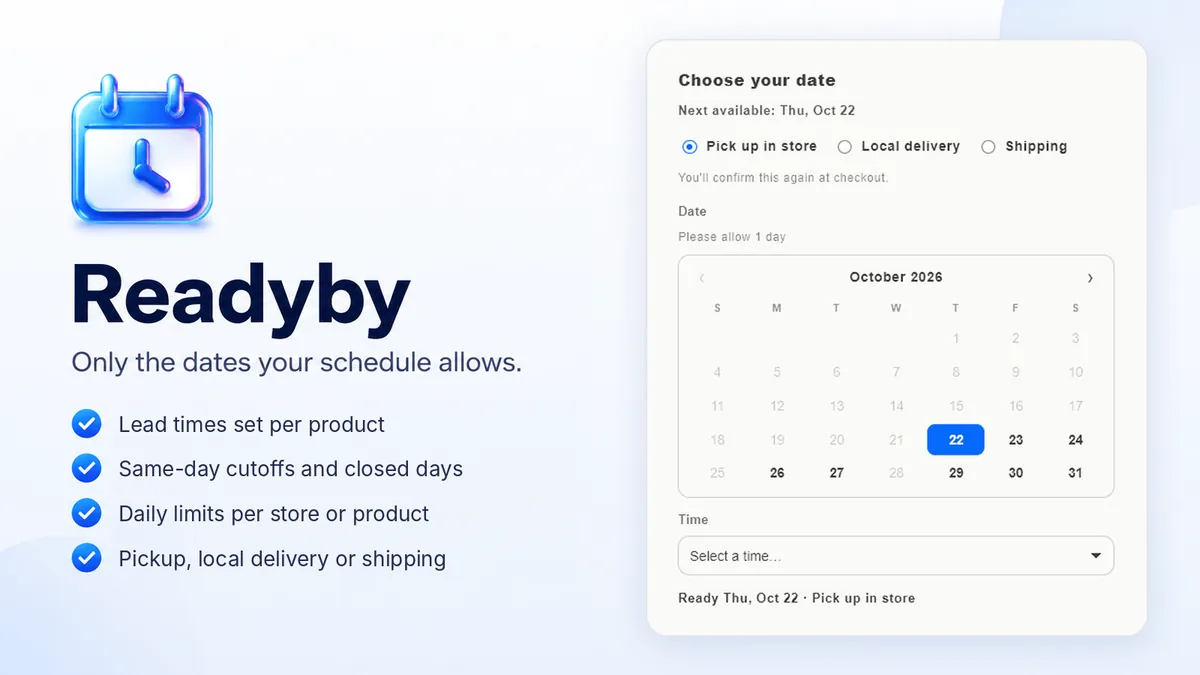
Readyby adds a date picker to your product pages, built for stores that make what they sell: bakeries, butchers, florists, meal prep, custom fabrication. Most scheduling apps treat notice as one store-wide setting. Readyby sets it per product. A custom cake can need 72 hours while cookies need 24, and each keeps its own date in a mixed cart. Shoppers only ever see the dates your schedule allows.
Install in a couple of clicks and set your first lead time in minutes. The Free plan covers pickup scheduling in full, time slots included, up to 25 scheduled orders a month.
See it in action
Forty seconds: a lead time set per product, a mixed cart keeping a date on each line, and the date landing on the order. Watch on YouTube →
New in Readyby
See all updates →Kitchen slips print themselves
Connect a Star receipt printer and every new order with a date prints a slip in your kitchen, with no computer or app open. Reprint any slip in a click.
Shipping dates
Next to pickup and delivery, shoppers can pick the day an order ships, or an estimated arrival day with your transit time added, only on the days you ship.
Limits per product, by item
Cap a single product, like 10 custom cakes a day, or count your daily limit in items instead of orders. A full day stops being offered, even mid-cart.
What Readyby does
Lead times per product
A mixed cart keeps a date per item, so nothing is promised too soon.
Same-day cutoff
Past your cutoff time, same-day capable items roll to the next day on their own.
Daily capacity caps
Set how many orders a day you can take. Once a day hits its cap it stops being offered to shoppers.
Closed days & blackout dates
Holidays, vacations and the weekdays you’re shut come off the calendar automatically, and yearly holidays only need adding once. Products can have their own ready days too, like cakes only at weekends.
Pickup or local delivery
With postal-code zones for delivery, plus optional pickup time windows such as morning or afternoon.
Slips on your receipt printer
Connect a Star CloudPRNT printer and every new dated order prints a kitchen slip by itself: order number, ready date, method, time and items.
Shipping dates too
Shoppers who want it posted pick the day it ships, or the day it arrives with your transit time added, on the days you ship.
The date lands on the order
Whoever packs it sees exactly when it’s due.
Upcoming orders and a prep list
See every order by the day it’s due, with how many of each item to make for that day. Print it, download it as a spreadsheet, or add your orders to Google, Apple or Outlook calendar.
How it works
Set your schedule
Lead time, same-day cutoff, open days, booking window, daily capacity, and which methods you offer.
Add per-product rules
Give the products that need more notice their own lead time.
Add the picker to your product page
One button opens your theme editor on the product template; drop the Readyby date picker block under the Buy button and save.
Customers pick a date
Only from dates that satisfy every rule above. Their choice is saved to the order.
Pricing
Start on the free plan and move up only when you need more. Billing runs through Shopify, and you can change or cancel anytime.
Free
Store pickup (at one or more locations), pickup time slots, per-product lead times and ready days, daily limits by orders or items and per product, same-day cutoff, open days, blackout dates, a calendar or dropdown picker, Upcoming orders with a prep list, up to 25 orders with a date/month
Start freeStarter
Everything in Free, up to 500 orders with a date/month, local delivery with postal-code zones, shipping dates, receipt printer slips, no “Powered by Readyby” badge
Choose StarterSettings, product rules and blackout dates are never metered. Every plan meters one thing only: the number of orders that carry a date, per calendar month. Open any order and look for the “Ready by” line to see what counts. Time slots are on the free plan, not held back. Starter includes a 7-day free trial, billing runs through Shopify, and you can cancel anytime.
Frequently asked questions
Why use Readyby instead of paying a developer to build it?
A custom build is yours to maintain. When Shopify changes checkout, its APIs or how themes work, someone has to update it, and with custom code that is your developer, on your bill. With Readyby we maintain it for you. Updates and new features are included on every plan, Free included, and support is included too: email support@dropfeed.io and the people who build the app answer. There is nothing to pay up front, and the block sits in Shopify’s theme editor, so editing or updating your theme does not overwrite it.
I sell boxes of mixed cookies or treats. Is Readyby right for me?
Readyby is for orders that need a pickup or delivery date, such as made-to-order cakes. If what you sell is a box where customers choose their own mix, say any 6 or 12 cookies at one price, Choosebox is the better fit. You can run both: Choosebox builds the box, and Readyby adds the date if you need one.
What if different products need different notice?
Set a lead time per product. With the product page picker each item keeps its own date, so a 3 day cake and a 1 day pastry can be bought together. The cart picker sets one date for the whole cart and uses the longest lead time in it.
Does Readyby change my checkout?
No. It adds a picker to your product page and writes the chosen date, method and time window onto the order. Shopify checkout is untouched.
Can I stop taking orders for one specific day?
Yes, add it as a blackout date for a one-off closure, or lower that day’s capacity. Closed days disappear from the picker.
Whose time zone do the cutoffs use?
Yours. All date math runs in the store time zone you set, so “same-day before 2pm” always means your 2pm.
Where do I get it?
Readyby is live on the Shopify App Store, with a free plan.
Guides
More from Dropfeed
Start free with Readyby.
Install from the Shopify App Store in a couple of clicks. The free plan has no time limit and no card.